

The playlist that you like is more than just a collection of songs. It is a journey down the road, an end of a relationship, a work-out, and a gloomy Sunday all at once. Now consider having a character who will take people on such a journey and explain each song in the process, taking a pause between songs to do so. A talking photo, created with the help of Pippit, can do the job by telling the story about the playlist in the right tone of voice. No need for any studio, camera, or endless editing. Just come up with your idea and create your avatar.
Every playlist has a plot
Just check out the order of your favorite playlist. There will be always some introduction setting the tone, something where the energy is rising, some valley, and a climax where everything calms down after that. This is a story arc whether you wanted one or not. The avatar should help reveal this arc. They can start off by introducing the first song in a way like introducing yourself, reflect upon the mood change in the middle, and finish off with a conclusion. What I really love about this form of narration is that you don’t have to go into any specifics regarding music, you just have to say why you think of these songs as a journey.
Mapping songs to scenes
Divide your playlist into sections and choose what your avatar will say when he/she gets there:
-
The beginning: a brief introduction to set the tone and destination.
-
The buildup: the place where energy builds up and the avatar becomes enthusiastic.
-
The detour: something unexpected on your list that requires some explaining.
-
The low point: a quieter point of your trip with gentle, slow narration.
-
The end: the conclusion of the story and farewell remarks.
Three or five points are enough for your first journey.
Bringing your own atmosphere to the ride
Your avatar talks between tracks, and SeedAudio 1.5 can create the mood around those moments.
Music written from a description
Describe the feeling you want, such as dreamy synths with a slow pulse, and original background music arrives along with the voice.
A voice that stays recognizable
Provide a reference recording and the tone and delivery stay consistent, so your avatar sounds like the same person from the first stop to the last.
Transitions placed to the second
Timestamps let a sound or a musical cue arrive precisely when your avatar introduces the next stop.
Room for a long ride
A single generation can run up to six minutes, which is long enough for a full journey with several stops.
What stays off limits
The model doesn’t generate copyrighted material, so your avatar discusses songs rather than reproducing them. Describe the feeling in your own words, and keep lyrics out of the script.
Three stops between your playlist and your video
Now that your route is planned, here’s how Pippit turns it into a video.
Step 1: Pick your travel guide
Sign into Pippit and click on Video Generator.
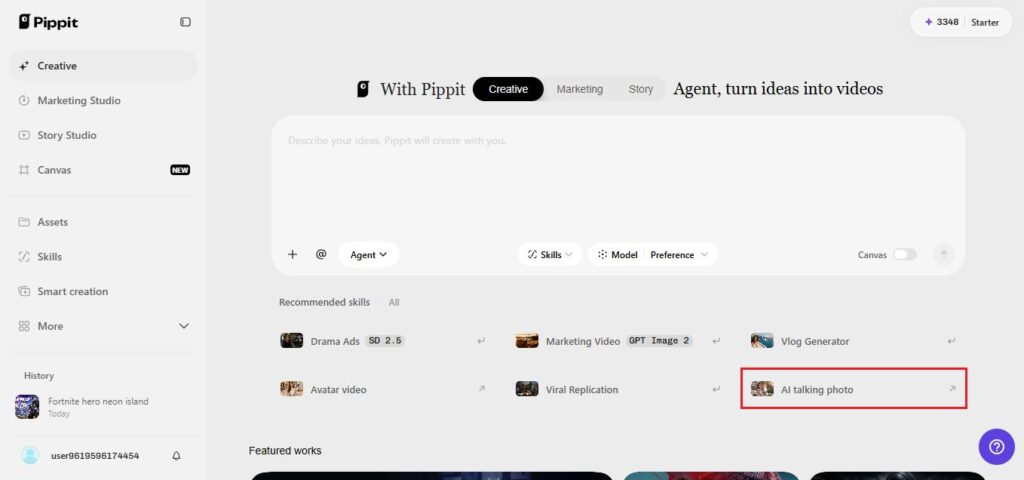
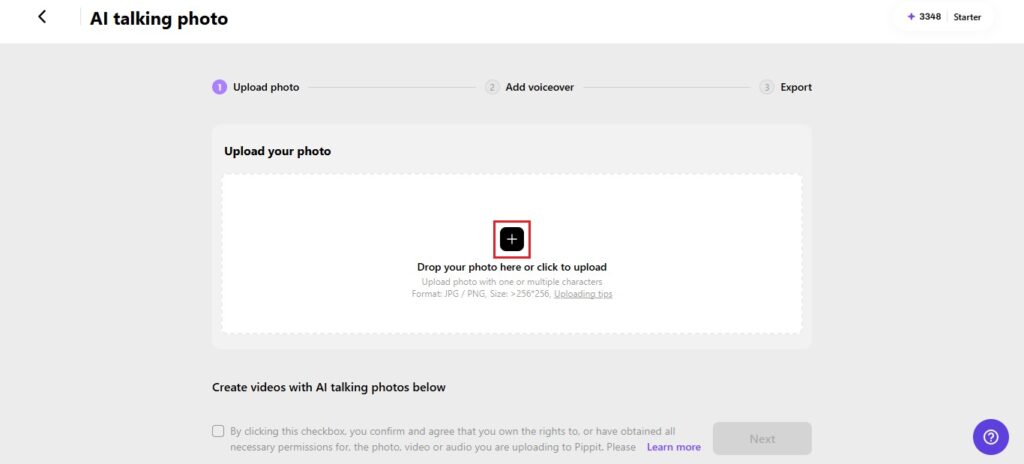
Select the AI-powered tool for giving a still image a talking power, and then upload your avatar either by clicking on the box or dragging the image inside it. Your image must have at least 256×256 pixels. Verify the right to use the image, then click on Next.
Step 2: Writing the commentary
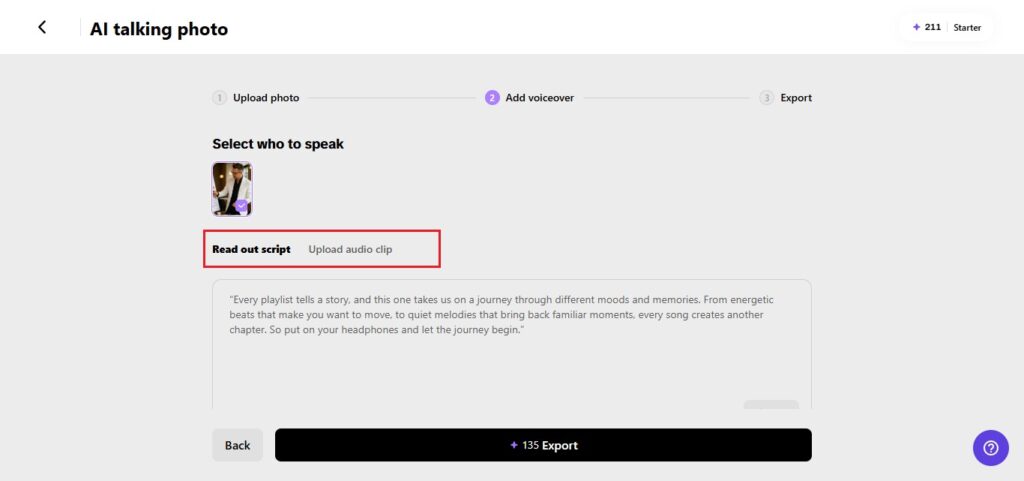
Select the “Read out script” and then write what your guide will say in between the tracks. Select the appropriate language and voice with proper energy, then pick a caption type and click on Save. In case you wish to use your own voice, the “Upload audio clip” tab will help you do it.
Step 3: Export the journey
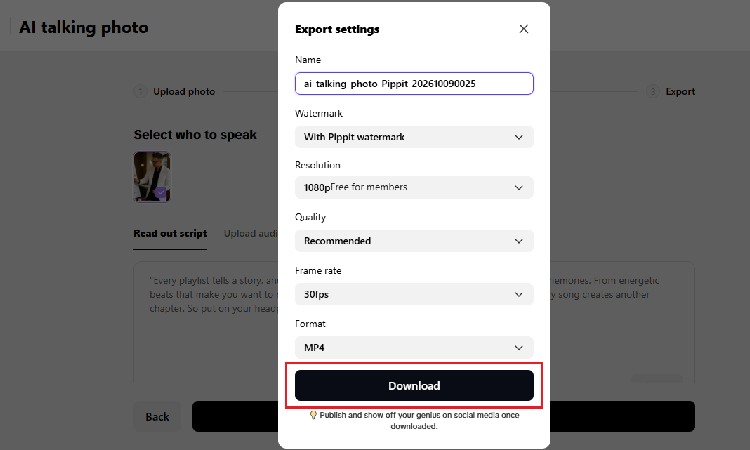
Press Export and rename the file. Decide whether to keep the watermark, then pick the resolution, quality, frame rate, and format you want. Click Download to save the finished video.
Talking about music without describing it to death
Music is hard to put into words, so don’t try to explain every note. Focus on feelings and memories instead. Say what the track reminds you of, where you were when you first heard it, or why it belongs at this exact spot in the list. Keep each comment to two or three sentences, since your viewers are there for the journey, not a lecture. Use sensory language: warm, crunchy, floaty, restless. And leave room for silence. A short pause after the introduction lets the mood settle before the next stop. If you’d like to credit artists, name them plainly, but never quote their lyrics in the script.
Playlist journeys beyond your own taste
Once you’ve built one, the format stretches easily. Create a journey for a season, like a slow autumn walk. Build one for a situation, such as the morning commute or the midnight drive. Ask friends for a track each and let the avatar introduce them as passengers. Make a themed series where every episode explores a different decade or mood. Creators can use the format to introduce a podcast, a radio-style show, or a music newsletter. Whatever the version, the structure stays the same: a guide, a route, and stops along the way.
Small touches that make the ride smoother
Pick a portrait with a friendly, open expression, since your avatar will be speaking for a while. Keep clips short, ideally under a minute per stop, and link them together if you want a longer journey. Check that captions stand out against your background. Make sure the pace of your script leaves room for the music you’ll add afterward. Watch the whole thing on a phone before posting. And finally, give your avatar a small habit, such as the same greeting at each stop, which makes the series feel personal and easy to recognize.
Press play on your own story
A playlist says a lot about the person who made it, and an avatar can say the rest. With Pippit, you can turn your favorite tracks into a guided journey with a face, a voice, and a point of view. Choose your stops, write the commentary, and let the ride begin. Open Pippit today and take your listeners on the trip.